Features
The full list.
No over-promising.
Here is everything OpusRH does today — and, further down, what it does not. We would rather give you an honest list than a demo that disappoints at rollout. Every line below matches a feature that is delivered and usable.
✓ delivered and usable ◔ optional, to be enabled, or partial — spelled out on each line
What the agent measures
- Active time and inactive time, measured once per second. Adjustable inactivity threshold: 2 minutes by default, from 30 seconds to 1 hour.
- Foreground application and its window title, truncated at 200 characters. A switch shorter than 5 seconds creates no entry.
- Windows session state: open, locked, asleep, screensaver running, closed — detected immediately, not at the next sample.
- Video meetings and calls: an active microphone is detected and the period is counted as work, not as inactivity.
- Simulated presence counters: movements, clicks, scroll wheel, keystrokes, number of distinct keys, regularity of intervals, mouse speed.
- Works offline: measurement continues without a network and resumes exactly where it stopped once the connection is back.
- Bounded local retention: the buffer on the workstation is deleted automatically beyond 60 days by default.
- Resistant to clock tampering on the workstation: universal timestamps and an internal counter unaffected by clock changes.
- Remote desktop servers: one measurement per open session, with no duplicates, on a shared machine.
- No interface on the workstation: no window, no icon, no notification to the employee.
- Encryption of the local buffer — optional, to be enabled: the workstation encrypts with a public key and cannot decrypt; only the server holds the private key.
Dashboards and profiles
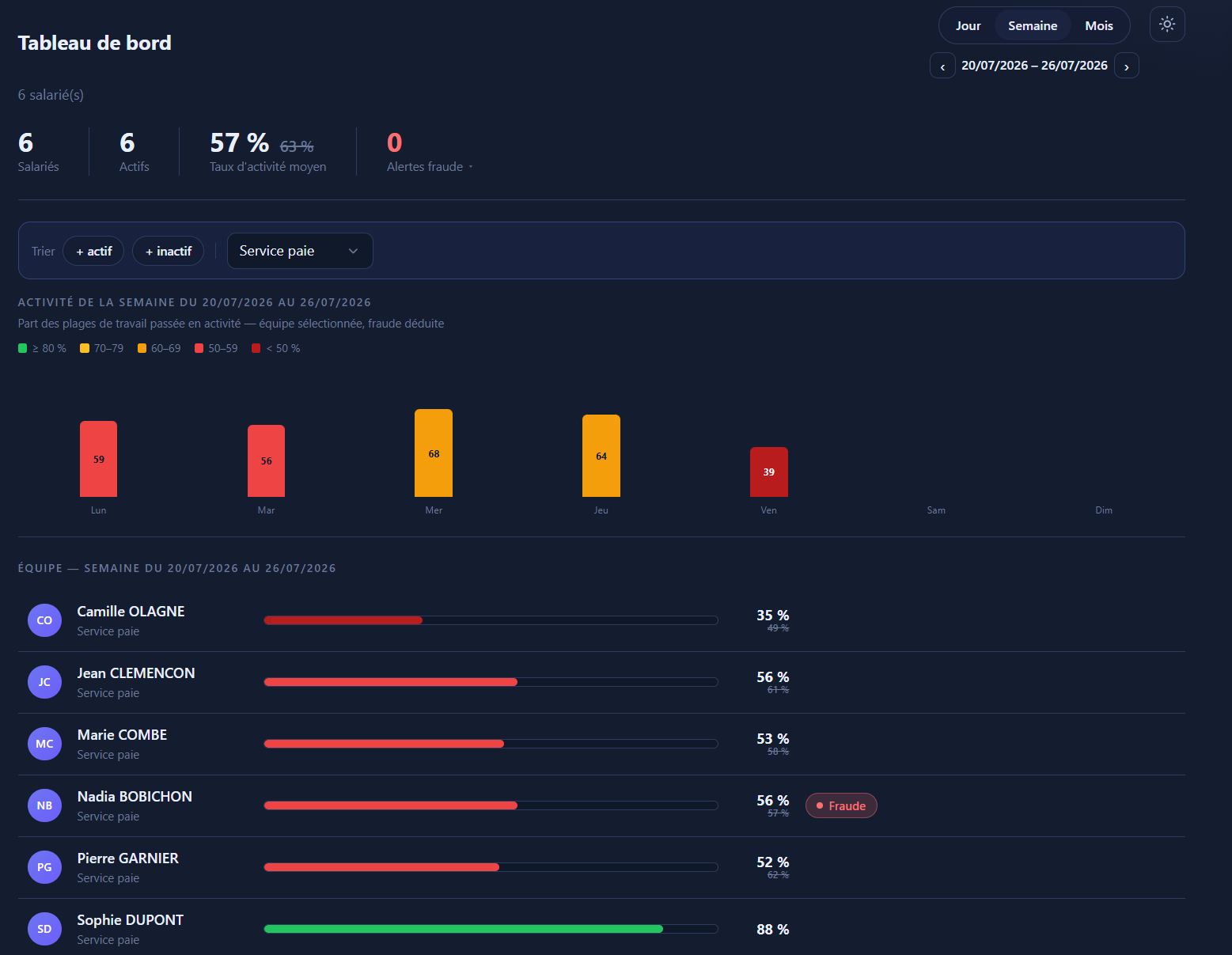
- Team dashboard at three scales: day, week, month, with navigation back through past periods.
- Four headline figures: headcount for the period, employees who had activity, overall rate, alert count.
- Activity rate histogram by hour (day) or by day (week, month). Clicking a bar opens the matching day.
- Timeline per employee: green active, amber inactive, grey not covered, red simulated presence, with the working hours shown under the timeline.
- No misleading “0%”: the screen states the real reason — no working hours that day, day not started yet, employee on leave or running late.
- Employee profile: breakdown pie chart (active, low-intensity, fraud, inactive, not covered) in hours and in percentages.
- Hoverable timeline: start time, end time, duration, state, application and window title. Two scales: working hours only, or 0:00 – 24:00.
- Week view: the seven days as rows with a summary; public holidays, leave and days before the employee joined are taken out of the calculation.
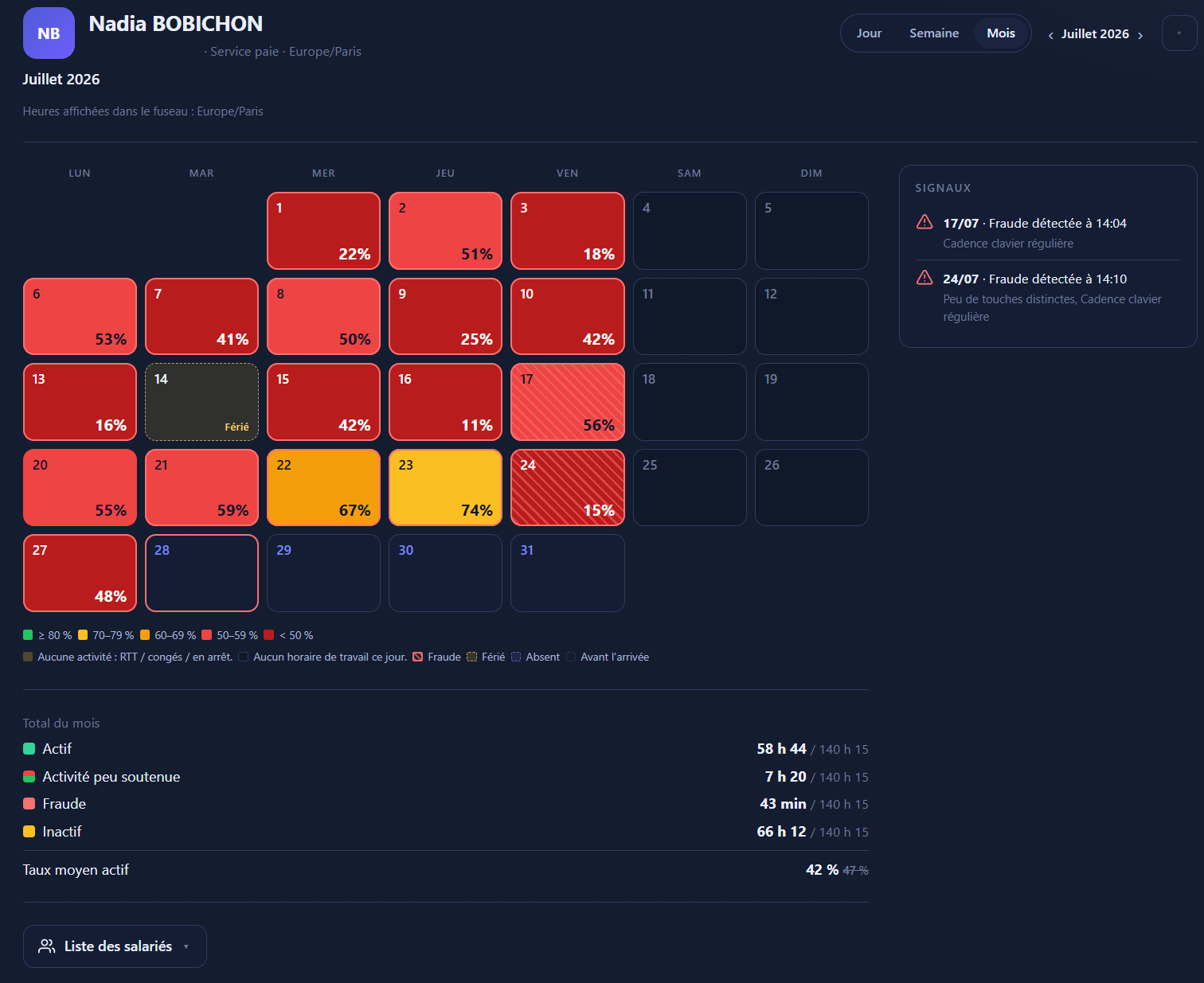
- Month view as a calendar: one coloured square per day, hatching on days where an anomaly was detected, each cell opens the detail.
- Detailed day log, line by line, with the number of entries displayed.
- Activity rate net of anomalies: simulated presence time is subtracted, and the raw rate stays displayed, struck through, next to the corrected one.
- Statistics faithful to history: the figures for a period belong to whoever was on the team at that time, with the working hours in force back then.
- Email reports daily, weekly and monthly, sent at midnight in each recipient's time zone.
- Individual follow-up: a daily report covering only a few designated employees.
- Scope respected: a manager only sees their own groups, checked server-side — editing the address in the browser gives access to nothing more.
- Light or dark theme, French or English interface, chosen by each user.
Simulated presence detection
- Off by default: each company chooses to turn it on, with a single switch, knowing what it does.
- Ghost keys: presses on F13-F24, Scroll Lock or Pause — the signature of anti-idle software.
- Metronomic typing: intervals between keystrokes too regular to be human.
- Repeating macros: sustained keyboard activity using only a handful of different keys.
- Mouse without clicks: a cursor moving for a long time without a single click or scroll.
- Constant mouse speed: a human hand accelerates and corrects itself; an automated movement does not.
- Low-intensity activity: one movement just before the screen goes off, back to inactivity, and so on — the time is recalculated in slices.
- The detected time is subtracted from the activity rate everywhere: dashboard, profiles, reports.
- Time-stamped signals on the employee profile, in day, week and month views, with the reasons in plain language.
- Alert panel on the dashboard; each manager can hide an alert from their own view without clearing it for the others.
- Three-stage email alert: detection, reminder while it lasts, summary at the end with the actual duration.
- Adjustable thresholds and durations, each with an explanation and a worked example.
- Safeguards against false positives: minimum activity duration, minimum share genuinely active, alert de-duplication.
- Video calls are excluded from the recalculation: a silent meeting is never taken for simulated presence.
- Four additional modes delivered but off by default, more prone to false positives — to be enabled case by case.
Teams, working hours, leave
- Groups and teams: creation, bulk assignment, managers per group.
- Dated membership history: a day's activity is attached to the person's group on that day, not to their current group.
- Reporting tree: visibility flows down the tree, with adjustable depth and barriers to cut off a branch.
- Working hours as time windows, to the minute, assigned to days of the week. Overlaps are refused.
- Company → group → employee cascade: each level inherits or overrides, with a one-click return to inheritance.
- Bulk application of a work schedule to several groups or employees — or a reset to inheritance.
- Versioned working hours over time: past periods stay calculated with the schedule in force back then.
- Time zones per company, group or employee: everything is stored in universal time and shown in local time.
- Leave (holiday, sickness, training, other) with start and end date and time, subtracted from expected time.
- Public holidays per team, with an individual exception for those who did work that day.
- Days before the employee joined are neutralised: they drop out of every average instead of dragging it down.
- Anonymisation of a departed employee: identity, directory links and window titles erased, licence freed, team volumes preserved.
- Employee record: readable display name when the Windows account is not a personal one, email, phone.
- Audit trail of HR decisions: group creation, assignment, schedule change, leave, public holiday, anonymisation, export.
05 — Optional module
Time tracking: real-time tasks
The declarative counterpart to measurement: the employee starts and ends their tasks from a discreet bar on their desktop. The times are set by the server at the moment of the click — no more timesheets to fill in from memory on Friday evening.
For the manager
- Create a task with its rhythm: once, on a due date; on fixed days of the week; or every working day, with no end.
- Three sharing modes: “single” (whoever takes it first handles it), “once each”, or “permanent routine”, repeatable at will.
- Assign to one employee, to a whole group, or to a mix of several of both — editable afterwards.
- Self-service team task: it stays without an owner until a member takes it, and can never be taken twice.
- Four-column tracking board: Scheduled, Available, In progress, Done, day by day and by group.
- Who did it, who did not: the tasks never taken, the due dates passed, and employees on leave kept apart so they are not blamed unfairly.
- Live workload next to the tasks: each employee's activity rate for the day, from the least to the most active.
- Written briefing to read before starting, and a completion note that can be required at the end, readable back in the console.
- Reassignment of a task not yet started or on pause, without ever moving time already worked by someone else.
- Fine-grained activation: a company switch, then per group, then per employee. Nobody has the module until it is turned on.
For the employee
- Desktop bar with the current task, its timer, and the Pause and Finish buttons.
- Expandable list of the day's tasks, each with its Start or Resume button.
- Visual cues: “In progress”, “To do”, “Team”, “Routine”, due date, a “Late” badge, a red edge for anything urgent.
- The bar follows the active window and never steals keyboard focus: it does not interrupt work.
- Create your own task and start the timer immediately.
- Access without a password: a one-time sign-in link, valid for about a minute, opens the personal space in the browser.
- Personal space: their live tasks, the timeline of their day, their working hours, and the expected / declared / remaining summary.
- One task at a time, guaranteed by the database even on a double click.
- Time bounds: no starting outside working hours, and automatic closing at the exact end of the work window.
- Works without a network: clicks are kept and replayed once the connection is back, never creating a duplicate.
- Recovering from a mistake: a task finished by accident can be put back to do the same day, without losing the time already counted.
- The desktop bar is Windows-only and its interface is in French; the web personal space, on the other hand, is bilingual.
Installing and maintaining the fleet
- Installer generated on demand for each company: server address and enrolment key already embedded.
- Silent installation, no window and no questions: deployable with IT's usual tools.
- Automatic enrolment of the workstation at first start, with nothing to do for the employee or the technician.
- Revocable enrolment key per company: workstations already installed carry on, no new one enrols with the old key.
- One person recognised across all their workstations joined to an Active Directory domain or to Microsoft 365: desktop and laptop then count as a single employee in the statistics and in billing. On workstations using local Windows accounts, with no domain, each profile is counted separately.
- Startup a standard user cannot disable: a scheduled task run by the system, restarted within 5 minutes of being stopped.
- Cascading startup guarantee: if the main mechanism fails on a workstation, the installer falls back to an alternative.
- Remote fleet update: published from the console, signature verified before execution, and the agent restarts itself.
- Non-destructive update: the workstation's settings are preserved and the startup tasks put back in place.
- Remote settings: thresholds, frequencies, retention — applied without touching the workstations.
- Server-driven suspension: measurement stops cleanly for an employee without a licence or for a suspended company.
- Blocking a workstation by machine identifier: access invalidated immediately, reinstallation refused.
- Fleet inventory: machine, hardware identifier, installed version, last report, status.
- Uninstallation: the built-in command removes the startup entry; there is not yet a full uninstaller or remote uninstallation.
Security, administration, compliance
- Sealed client workspaces: nothing is mixed between two companies.
- Reseller mode: several client companies and one overall licence pool to allocate.
- Four levels: vendor, reseller, company administrator, manager.
- Two-factor authentication by one-time code sent by email, on by default.
- Traceable and revocable sessions: validity is rechecked on every page, so a revoked session stops working immediately.
- Security log: successful and failed sign-ins, role changes, restores, the vendor entering a client workspace — with IP address and outcome, exportable.
- Separate system log for technical incidents, with its own retention period.
- Audit record per account: activation, recent sessions, resets, action history.
- Blocking of abusive sign-in attempts by address, with adjustable thresholds and immediate manual unblocking.
- Monitoring of automated jobs: every background job reports its last run, its duration and its result.
- No value hard-coded: every threshold is a documented setting, with bounds and a worked example.
- Automatic deletion of activity data beyond the retention period chosen: 160 days by default, adjustable, and never less than 90 days.
- Anonymisation of a departed employee after a period of inactivity confirming the departure.
- Online subscription: licences added pro rata, reductions scheduled for the renewal date, cancellation and reversal of cancellation.
- Factur-X invoices and credit notes (PDF/A-3, EN 16931 standard), unbroken numbering, archiving and re-download.
- Automatic identity checks: SIREN verified against the official register, intra-EU VAT number against the European VIES service.
- No secret in clear text: passwords transformed irreversibly, keys and tokens stored only as fingerprints.
- High availability: several servers in parallel, background jobs picked up automatically if the lead server goes down.
- GDPR export of an employee's file — to be enabled by the vendor, restricted to company administrators; the reseller is deliberately excluded from it.
- Full database backup and restore — triggered manually from the console, no automatic scheduling.
Transparency
What OpusRH does not do
A feature list with no limits is a list that lies. Here is what the product does not do today — so that you can decide quickly, with no bad surprise after signing.
This is not a surveillance tool
- No screenshots, no keystroke logging, no webcam access
- No record of the websites visited, no browsing history
- No “productive / unproductive” categorisation of applications
- No individual trust score, no artificial intelligence
- No blocking, filtering, remote control or workstation locking
- No geolocation, no tracking beyond the workstation
This is not an HRIS
- No leave request and approval workflow
- No leave balance, no time-off-in-lieu balance, no overtime counter
- No notion of employment contract, declared part-time work or annualised hours
- No payslip generation, no export to payroll
- No badging in and out of a site
- Night shifts crossing midnight cannot be modelled as a single work window
Technical limits we own up to
- The agent and the desktop bar are Windows-only — no macOS, no Linux, no mobile
- No directory synchronisation (Active Directory, Microsoft Entra ID)
- No sign-in with a corporate identity (SSO, SAML, OpenID)
- Two-factor authentication by email only — no app, no SMS, no hardware key
- No public API, no outgoing webhook, no HRIS or payroll connector
- No file import to populate employee records
What we do not claim
- No ISO 27001, SOC 2 or HDS certification
- No contractual uptime commitment with figures
- No “real-time” dashboard: pages are consulted, they do not stream live
- No spreadsheet export of activity statistics (only an employee's GDPR file can be exported)
- No PDF report: reports arrive by email, PDFs are reserved for invoices
- No separate visual customisation per client company