Work time analytics · Designed and hosted in France
Manage activity,
not people.
OpusRH measures the time actually worked on computer workstations and presents it as readable timelines and indicators — no screenshots, no keystroke logging, no camera. An analytics tool for HR and managers.
No credit card · No commitment · FR / EN
The short version
What is OpusRH for?
In an organisation where the work happens on screen, nobody really knows how the time is spread out. Declarations are approximate, spreadsheets lie politely, and managers make the call on gut feeling. OpusRH replaces that gut feeling with a measurement — objective, bounded and defensible.
An agent measures on the workstation
A lightweight program, installed on Windows workstations, checks once per second whether the keyboard or the mouse is being used, which application is in the foreground, and whether a video call is in progress. It counts events — never their content.
The server analyses and cross-checks
The measurements are set against the working hours actually scheduled for that day, against declared leave and against public holidays. If simulated presence detection is switched on, the time concerned is deducted. The result: an activity rate that means something.
You decide, with the facts
Team dashboards, a detailed profile for each employee, email reports, anomaly flags. The tool informs the decision; it never takes it in your place and it penalises no one.
Full transparency
What OpusRH measures — and what it will never collect
Trust starts with precision. Here is, exactly, what the agent installed on the workstations does. This list is written to be handed over as it stands to your employees and to your works council.
Measured
- Active and inactive periods, from mouse and keyboard event counters — numbers, never content
- The foreground application and its window title, truncated (200 characters by default), to understand how the work is distributed
- The state of the Windows session: open, locked, asleep, running a screensaver
- The fact that a microphone is in use — so that a video meeting counts as work, never as inactivity
- Only the working hours you define go into the activity rate calculation
Never collected
- The content of keystrokes (no keylogger)
- Screenshots or screen recordings
- Microphone audio or webcam video — only the “a microphone is active” indicator is read
- The content of files, emails or documents
- The addresses of the websites visited, browsing history, the clipboard
- Geographic location
Three uses
One measurement, three ways to use it
Working time
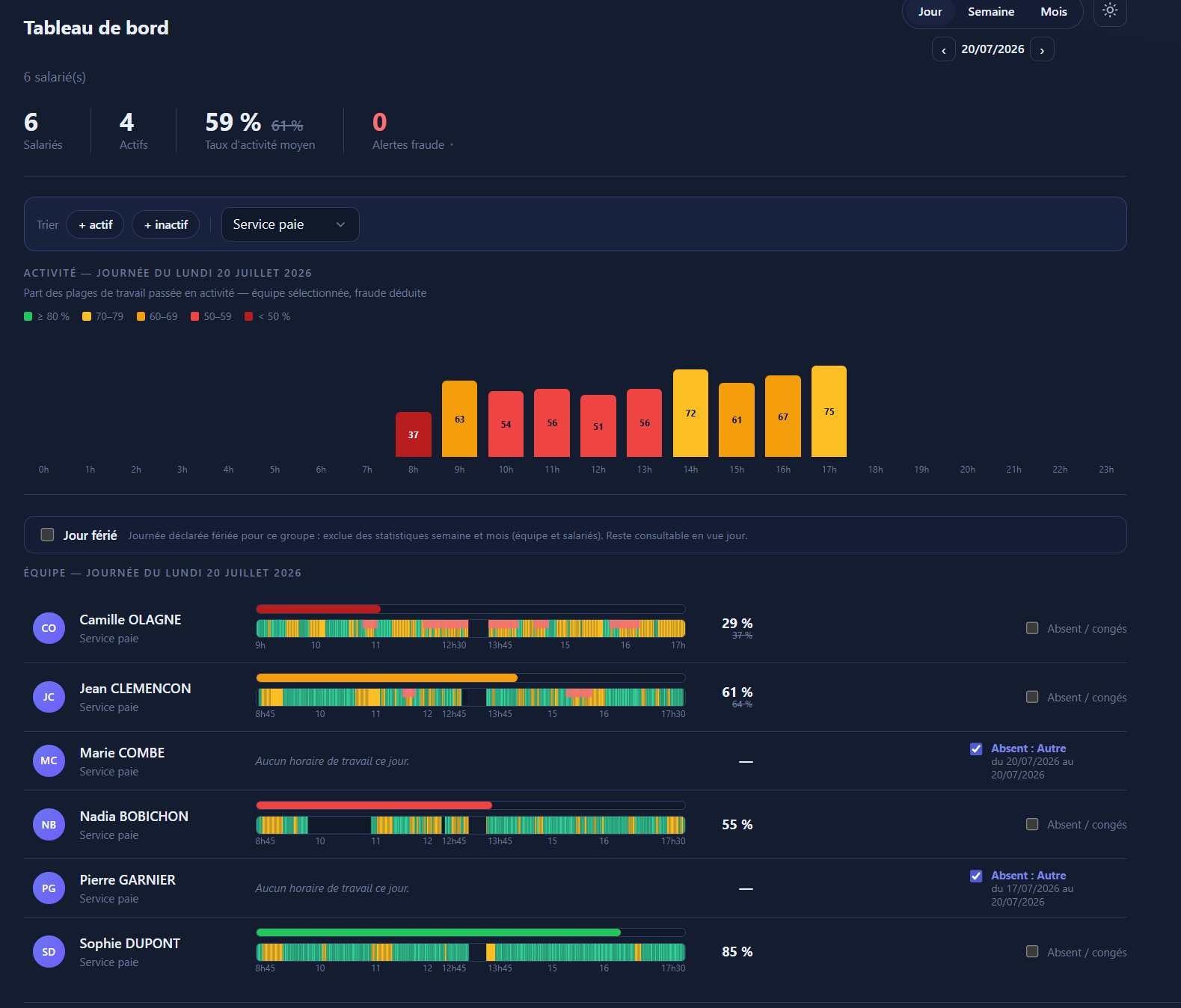
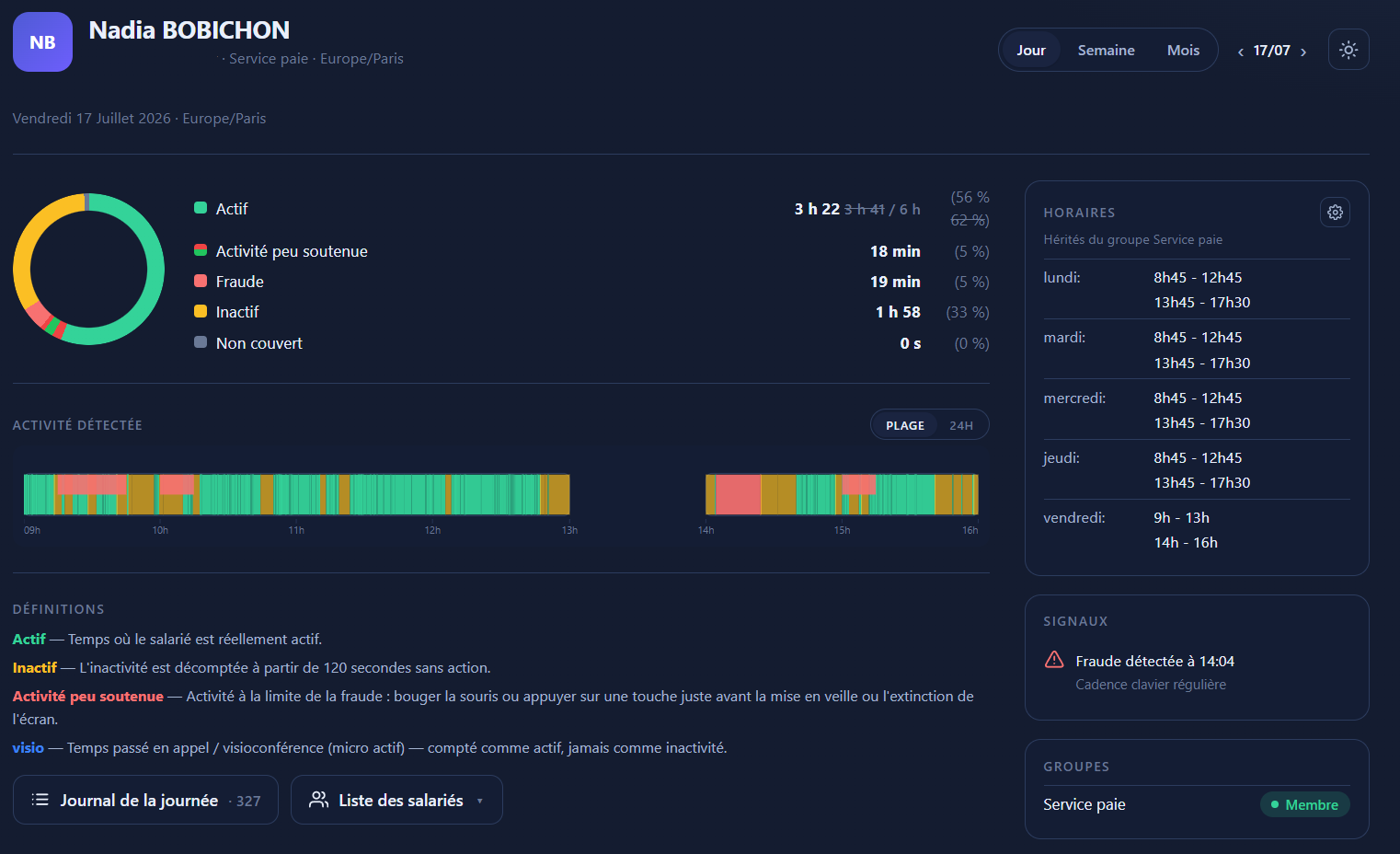
Team dashboard by day, week and month. A detailed profile for each employee: breakdown pie chart, hoverable timeline, line-by-line log, monthly calendar. Reports sent automatically by email.
Simulated presence
A mouse that moves but never clicks, metronomic typing, the ghost keys used by anti-idle software: several detection modes spot false activity, and the time detected is then deducted from the activity rate. Off by default: we switch it on at your request.
Real-time tasks
Optional module: the employee starts and finishes their tasks from a discreet desktop bar. The times are set by the server, never entered by hand. You know who did what, and for how long.
Sovereignty
Designed in France. Hosted in France.
OpusRH is developed by OREXIS, in the Ardèche. Your employees' data is hosted at OVH in Roubaix; hosting and email delivery take place within the European Union. No distant subcontracting, no opaque transfer, no extraterritorial law over your HR data.
French vendor
A French company you can reach, which develops its own software in-house — and knows the French employment law that governs this kind of arrangement.
Data in France
Hosting at OVH in Roubaix. Emails go through a French provider. No processing of your activity data outside the European Union.
Website with no third-party trackers
This site loads no remote fonts, no third-party scripts, no advertising networks. Audience measurement is done by our own servers, with no cross-referencing.
Compliance
Built with GDPR, not against it
Measuring activity at work is legitimate when it is proportionate, transparent and governed. OpusRH is built on those three pillars — and is upfront about what it does not do.
Minimisation
Counters, not content. No screen captures, no keystroke content, no browsing history, no geolocation. The scope is limited by design, and therefore verifiable.
Clear roles
Your company is the data controller; OREXIS acts as a processor (Art. 28 GDPR), on your instructions, under a data processing agreement.
Bounded retention
Activity data is deleted automatically beyond a period you set: 160 days by default, and no less than 90 days — long enough to handle a dispute.
Employee rights
A person's complete record (identity, activity, sessions, devices, leave) downloads as a spreadsheet archive. An opt-in feature, restricted to the company's administrators; every export is logged.
Departure = anonymisation
After a period of inactivity confirming the departure (30 days by default), one action by a tenant admin erases the employee's identity and the window titles recorded. The team's hour totals stay accurate.
No automated decision
Flags are indicators: any follow-up is a human decision by the employer. No automatic sanction, no artificial intelligence.
Frequently asked
What we get asked first
Does OpusRH record what employees type?
And when an employee is in a video meeting without touching the keyboard?
Is it legal to measure employee activity?
What happens during breaks?
Where is the data hosted?
See your organisation differently.
15-day trial, every feature, no credit card.